What Shield protects, and where it deliberately stops.
A network appliance is only as trustworthy as the boundaries it's honest about. Here's where Shield is designed to be effective, and the cases we deliberately don't pretend to cover.
What Shield protects against
Ads & ad networks
Network-wide blocking of known ad and ad-network domains across every device on your network.
Trackers & profiling domains
Reduces unwanted cross-site tracking before the connection is made, including from devices that have no built-in blocker.
Phishing & malware domains
Blocks known harmful domains at the DNS layer before traffic ever leaves the network.
Adult & unsafe content
Optional category-based blocking with SafeSearch enforcement on Google, Bing, YouTube, DuckDuckGo and the other supported search engines.
App & service blocking
Catalog-based blocking for supported apps and services, useful for parental and household controls.
DNS bypass paths
Local nftables enforcement resists common encrypted-DNS bypass tricks and Apple Private Relay traffic.
Where Shield deliberately stops, and why
Shield is a network‑level appliance. It is honest about what a network‑level appliance can and can't do, so you know when to reach for something else.
Devices outside your network
A phone on mobile data, a laptop on a café Wi-Fi, an IoT device on a separate network — by default, none of those are on your Shield, so its policy doesn't apply. We don't pretend otherwise. There are two answers. Travel Wi-Fi, for when the household is away together — over a cable on Shield Edge, cable-free on Shield Vault. And on Shield Vault, Follow-Me Filtering, where a phone connects back to your Shield through a free app so your rules follow it. The phone's owner can switch it off, and it depends on your home internet. Your Shield shows when each phone last connected.
VPNs and encrypted DNS on managed devices
A VPN tunnels traffic past local DNS. So does encrypted DNS on a determined device. Shield blocks common bypass paths and Apple Private Relay, but a determined user on a managed device can still tunnel out, what we give you is visibility, not coercion.
Universal app inspection
Shield filters at the DNS layer and at the network layer. It does not deep-packet-inspect every app or break TLS to read inside encrypted connections. We think that's the right boundary for a calm home appliance, but it means some app behaviour is opaque to Shield by design.
Hostile WAN exposure
Shield is designed to sit behind your modem on a normal home or office network. It is not hardened for being directly exposed on the public internet. If your network setup is unusual, talk to us before deploying it.
Endpoint security on the device itself
Shield protects the network. It is not anti-malware on your laptop, your phone, or your Mac. The two layers complement each other, but Shield is not a substitute for keeping endpoints up to date.
What stays local
Filtering decisions, they happen on Shield
Per-device policy and pause controls
The local web management UI
Internet pause and category exclusions
Encrypted local storage, switched on at setup (Vault)
Time Machine backup target (Vault)
Vault Wi-Fi access point clients (Vault)
What we don't store
Shield does not maintain a browsing-history report, a behavioural-profiling dashboard, or a query-log feed back to us. Several AdGuard Home defaults that would have produced these by accident have been disabled or restricted in our build, that work is part of what makes Shield an appliance and not a hobby image.
No browsing-history report kept by WOMBATS Shield
No behavioural profiling dashboard
No vendor cloud control-plane logs
No telemetry pipeline back to us
A promise you can check
No trackers here, either.
This website has no Google Analytics, no Meta pixel, no ad trackers, and no third-party cookies. It makes no requests to advertising or social networks. The one measurement we keep is a simple, cookieless page counter served from our own address — it counts visits, and it cannot follow you anywhere.
We advertise on Google, and almost every business that does hands Google a script that watches you. It loads on every page, reports every visit whether or not you buy, sets Google's own cookies in your browser, and can link what you read here to what you do on other sites.
We don't, and that is the whole difference. Your browser never contacts Google on this site. Nothing is reported while you read. Arrive from one of our ads and we set one cookie of our own, holding the click reference Google itself put in the link and nothing else; if you then buy, our server later tells Google a single line — that click became a sale. Google knows it sent you here, because it made the link. What it never learns is anything you did after that. If we advertise on Facebook or Instagram, the same one cookie holds Meta's click reference instead, and it goes nowhere: there is no Meta pixel here, and Meta is told nothing. Arrive any other way and the site sets no cookies at all.
The same is true of the Shield's own dashboard: it runs in your house and calls no third parties at all. We checked that ourselves on 26 August 2026, on a production Shield Vault: 302 requests across all nine pages of the dashboard, every one of them to the Shield itself, none to anyone else. Open your own Shield's dashboard with the Network tab showing and watch it talk to nothing but itself.
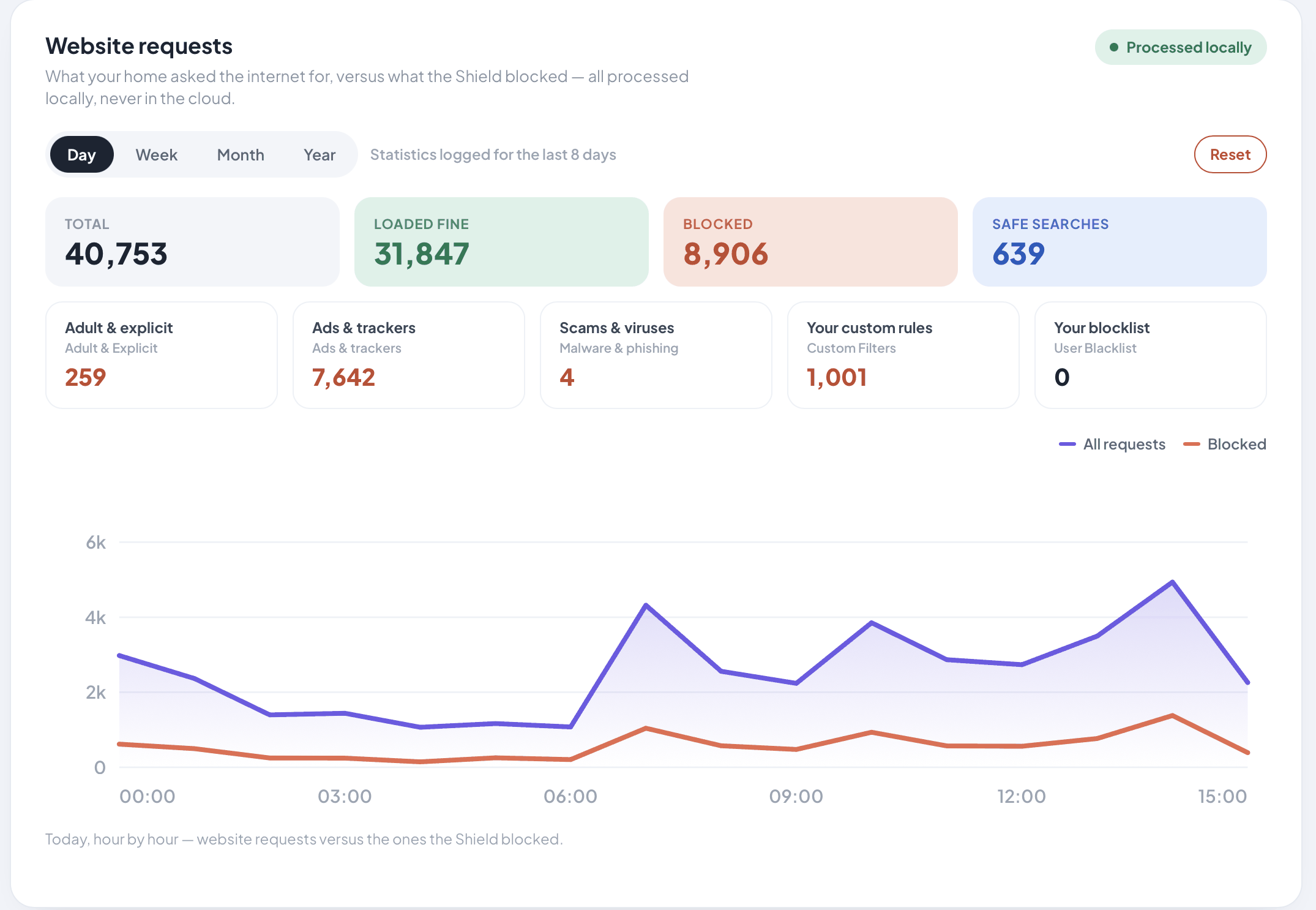
One day of website requests on a Shield Vault, counted on the Shield itself and never sent to the cloud.
Don't take our word for it. Open your browser's developer tools, look at the Network tab, and reload this page. What you see is everything we load.
Local‑first does not mean sealed off from the internet. Some functions reach out so the system stays useful and current. We list them so you know exactly what does and doesn't leave your network.
Filter list and catalog updates
Software bundle updates (signed and verified before applying)
Website lookups — asked directly of the internet's address servers at home; away from home, sent as an encrypted lookup to a provider you choose (Cloudflare by default)
Follow-Me Filtering on Shield Vault, if you use it. Most phones connect straight back to your Shield. If your internet connection has no public IP address (Starlink, many 5G and mobile broadband plans, hotel Wi-Fi), the phone connects through our relay in Australia instead — it only routes the connection, it's end-to-end encrypted, it can see a phone's IP address and when it is connected (which we don't log), and there's no subscription.
Optional support workflows you initiate
Website lookups
Handled, wherever you are.
Every device has to ask where a website lives before it can go there. That question has to leave your home, and who hears it depends on where you are.
At home, your Shield asks the internet's own address servers directly. No DNS company builds a picture of your household. Your internet provider can still see the names as they pass, as it always could.
On hotel, café or airport Wi-Fi, the risk is the network you are borrowing. There your Shield sends the question as an encrypted lookup to a provider you choose — Cloudflare by default — so that network cannot read your lookups. Worth saying plainly: encryption hides the questions, not the destinations. Any network carrying your traffic can still see where it ultimately goes; what it loses is the running list of everything you ask.
You do not set any of this up. Shield follows your Wi-Fi settings and switches by itself. If you would rather decide, you can pin it to the Shield or to an external provider at any time.
Architecture in one paragraph
The shape of Shield, from the outside in.
Shield is built on the Raspberry Pi 5, a single-board computer, the same board across Core, Edge and Vault, with a Debian 12 base. AdGuard Home provides the DNS-layer filtering engine, with restricted defaults to match our privacy goals. nftables enforces network policy on the device. Software updates land as complete, signed bundles that are verified before they're applied. Shield's encrypted partitions are unlocked at boot through a hardware-assisted key path burned into the board's own one-time-programmable silicon, bound to the device. On Shield Vault, the storage SSD — with encryption switched on when you first set up the drive — is separate from the system partition and is designed around three unlock paths: a silicon-bound auto-unlock key used at boot, a user passphrase, and a recovery key.
For the disclosure policy and the deeper security story, see our security page. If you believe you've found a security issue, write to security@wombatss.com.