Skip to content
WOMBATS Shield
Order

30-day home trial for AU & NZ homes — full refund if it isn't right. Details →

For parents who want some say in what the kids meet online.

House rules on every screen, home or away.

No cloud, No account. No subscription. Ever.

From your own phone, set what's blocked, when it's blocked, and which apps on which screen. That covers every phone, laptop, TV and smart device in the house, with nothing to install on any of them. The filtering happens in your house, not in someone's data centre, and nobody on the other end, us included, is building a picture of your family.

Protection from $424 AUD, inc GST. Buy once. Founding price locked in for life.

Founding Edition · 12 of 20 remaining

Pay in 4From $106.00 a fortnight with Afterpay or PayPal, interest-free — or Zip, with weekly, fortnightly or monthly repayments on Zip's terms.

Same total either way — $424 — and nothing recurring from WOMBATS.

Free AU/NZ dispatch during the founding batch · 12-month warranty plus Australian Consumer Law · Security updates until at least 31 December 2029 · International by Express courier · Designed and engineered in Australia.

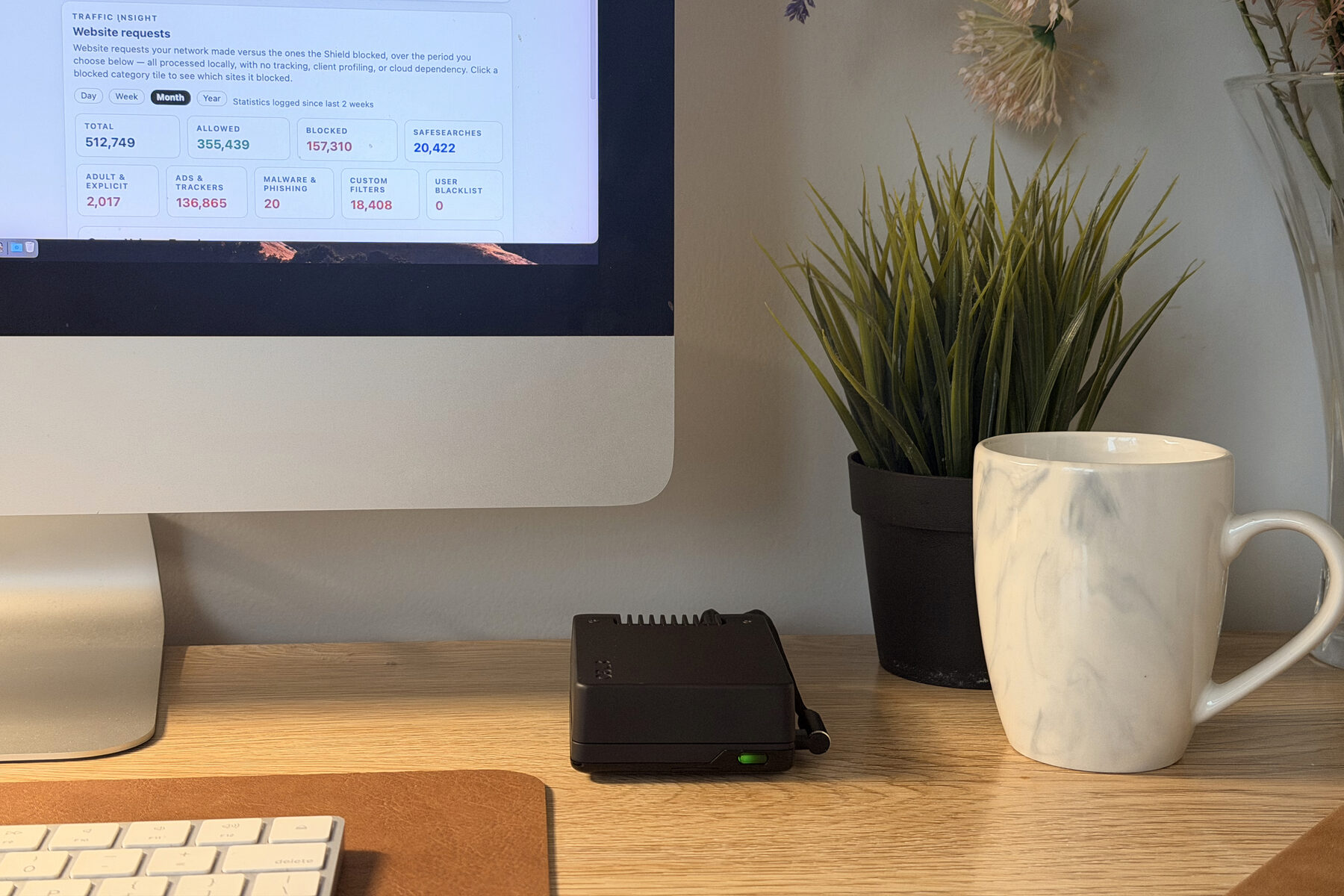
Shield Core on an oak desk beside an Apple keyboard, a plant and a mug, green status light on. Behind it an iMac shows the Shield dashboard's Website requests panel: 512,749 requests, 157,310 blocked.

What changes at home — and away

Less to keep an eye on.

Shield covers every device at home at once, so there's less to check screen by screen. The conversation stays yours.

The TV, minus most of the ads.

Fewer ads in places you could never block them before: the smart TV, free games, cheap apps. Adult content is blocked and SafeSearch stays on for every device on your home Wi-Fi, and links to known phishing sites are refused — with nothing installed on any of them.

See what an owner's two screenshots show →

Different rules for each child.

Bedtime and school-night hours for any device, or pause one tablet at dinner, on every Shield. On Shield Edge and Vault, each child's device gets its own filtering, SafeSearch and app rules — app schedules among them — so the eight-year-old's tablet and the fifteen-year-old's phone don't need the same ones. And when TikTok is off on a phone, it stays off: the Shield closes the app's main route and its backup routes.

Why TikTok stays off on a Shield →

Your rules go with the kids' phones.

On Shield Vault, Follow-Me Filtering connects the kids' phones back to your Shield through a free app, so the same filtering, SafeSearch and app rules apply on mobile data, at school, at a friend's place.

Follow-Me Filtering, on Shield Vault →

Files at home, reachable from away.

Shield Vault's free 256 GB SSD (paid upgrades to 4 TB) holds every computer's backups, Time Machine included, a shared family folder and the films you play on the TV. With Back to Shield, the same files open, copy and save from your phone or laptop away from home — your own drive, not somebody's cloud.

Back to Shield, on Shield Vault →
Apps that fight back

TikTok, Instagram and the other apps built to stay online switch to a backup route the moment the obvious one is blocked. A Shield closes the main route and the backup routes at the network, for one phone or the whole house, and we re-test the popular apps every month.

For parents

Australia's under-16 social media law is in force. It regulates the platforms — the phones, TVs and consoles it's about are on your home network, and that part was always yours to decide.

The first owners

Three households have been running one for months.

“When we use a public network, the amount of ads we see reminds us of the difference.”
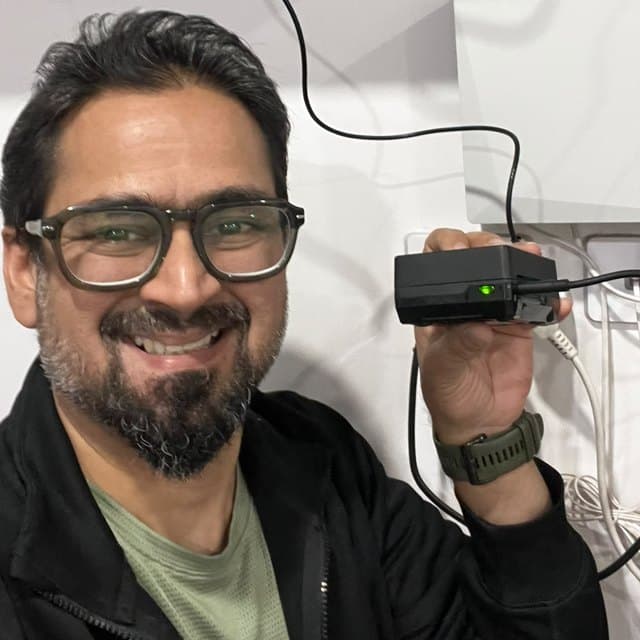
Bilal, in a cap and glasses, against a plain wall.

Bilal

Liverpool, NSW · Shield Vault

3 photosRead full review →
It just works, everything gets filtered, and nobody in the house has noticed it's there.
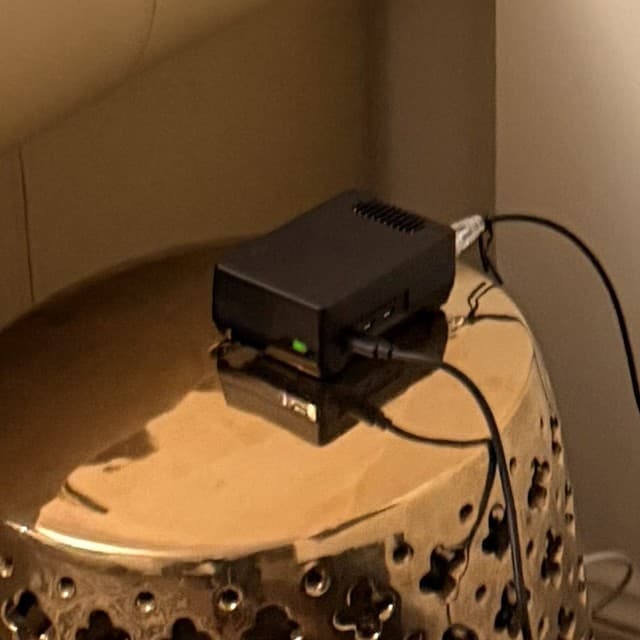
Haseeb's Shield on the brass side table in his lounge, green status light on.

Haseeb

Sydney, NSW · Shield Vault

Our account of what he told us, approved by him.

2 photosRead full review →

Keystone founding members — friends of the founder who took an early unit on founding-member terms. Approved by them.

See it working

What a Shield does, in two minutes.

Real screens from the Shield in our own house: a rule on one child's phone, school-night hours, what it blocks, who looks up your websites, Follow-Me, its own Wi-Fi on holiday, and what never leaves home. Device names are stand-ins.

What a Shield does, in two minutes · 2:07

One job per clip, each under two minutes: all the videos.

A note from the founder

Built by someone who wanted it on his own network.

Khalid, founder of WOMBATS Shield, in an Akubra hat on Sydney Harbour on a clear day.

Khalid Rafique

Founder, WOMBATS Shield · Sydney

Ask me:

I'm an electronics engineer who started using computers in the late 1980s and wrote my first program in 1990. WOMBATS Shield is the device I wanted in my own house, a small piece of equipment that protects every device on the network from one place, on hardware you own, with rules you can read for yourself. No account. No subscription.

If you have a question before you order — which model, whether it suits your modem, whether it suits you at all — message me. You'll get an answer from me, not a support portal.

Khalid · Founder, WOMBATS Shield

Read the full story

Setting it up

Modem Autopilot

Works out of the box. The whole house takes about fifteen minutes.

Out of the box

Every Shield broadcasts its own Wi-Fi as soon as it's switched on. Join it and you're behind the filter straight away — nothing to configure. It's deliberately modest: made for setting up and small spaces, not for streaming to a whole household.

Every device at home

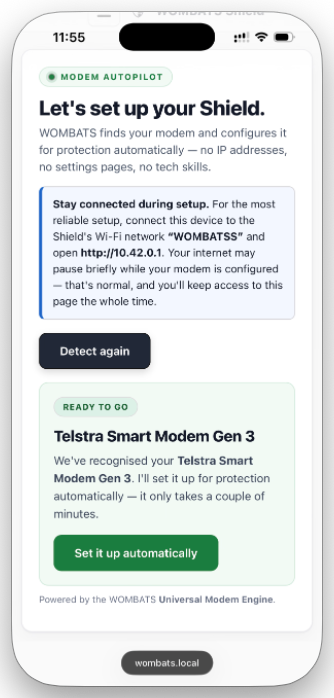
To protect every phone, laptop and TV already on your home network, Shield sets itself up with your modem. Modem Autopilot does the modem part for you, and the whole job takes about fifteen minutes.

Modem Autopilot on a phone: Let's set up your Shield. A Telstra Smart Modem Gen 3 is recognised and ready to go, with a Set it up automatically button.
Modem Autopilot, recognising a Telstra modem
  1. Plug it in behind the modem you already have. Your Wi-Fi name stays, and nothing gets re-paired.

  2. Let it set itself up. Join the Wi-Fi Shield broadcasts, have the admin login from your modem's sticker handy, and press one button. Modem Autopilot works with the modems in most Australian homes, and Guided Setup walks you through any it can't set up by itself.

  3. Choose your house rules. One set for everyone or, on Shield Edge and Vault, each child's device its own. Pause and bedtime hours work per device on every Shield.

Starlink, eero, Google Nest Wifi, Google Wifi or TP-Link Deco? They're set up through their own phone app, so talk to us before ordering.

Modems it works with, and how it fits →
Why this exists

Most home networks have quietly become someone else's territory.

The router phones home to a vendor cloud. The “protection” is a subscription that watches the same traffic it claims to protect. The data drifts off the property. We built Shield because we wanted the thing on our own networks, and we couldn't find one we trusted.

Shield is a small, calm appliance that takes care of filtering, parental controls, ad, tracker and adult-content blocking, and (if you want it) private storage, media, backups and travel Wi‑Fi. Then it stays quiet. Buy it once. Own it. Keep it for years.

Why a Shield is bought once, not rented
A different approach

Everything starts on your network.

  • No vendor cloud control plane
  • No traffic profiling, ever
  • No remote control by us
  • Filter lists update over the internet, control does not

The one thing any network must send out is the question “where does this website live?” At home your Shield asks the internet's own address servers itself, so no DNS company ever builds a picture of your household. Your internet provider still sees which sites you connect to, as it always has — Shield stops everyone else building the profile.

Live, on your network

See exactly what Shield is doing, quietly.

No telemetry leaves your house. The dashboard runs on Shield itself, on your network. Pause a device, exclude a category, or just leave it alone for months.

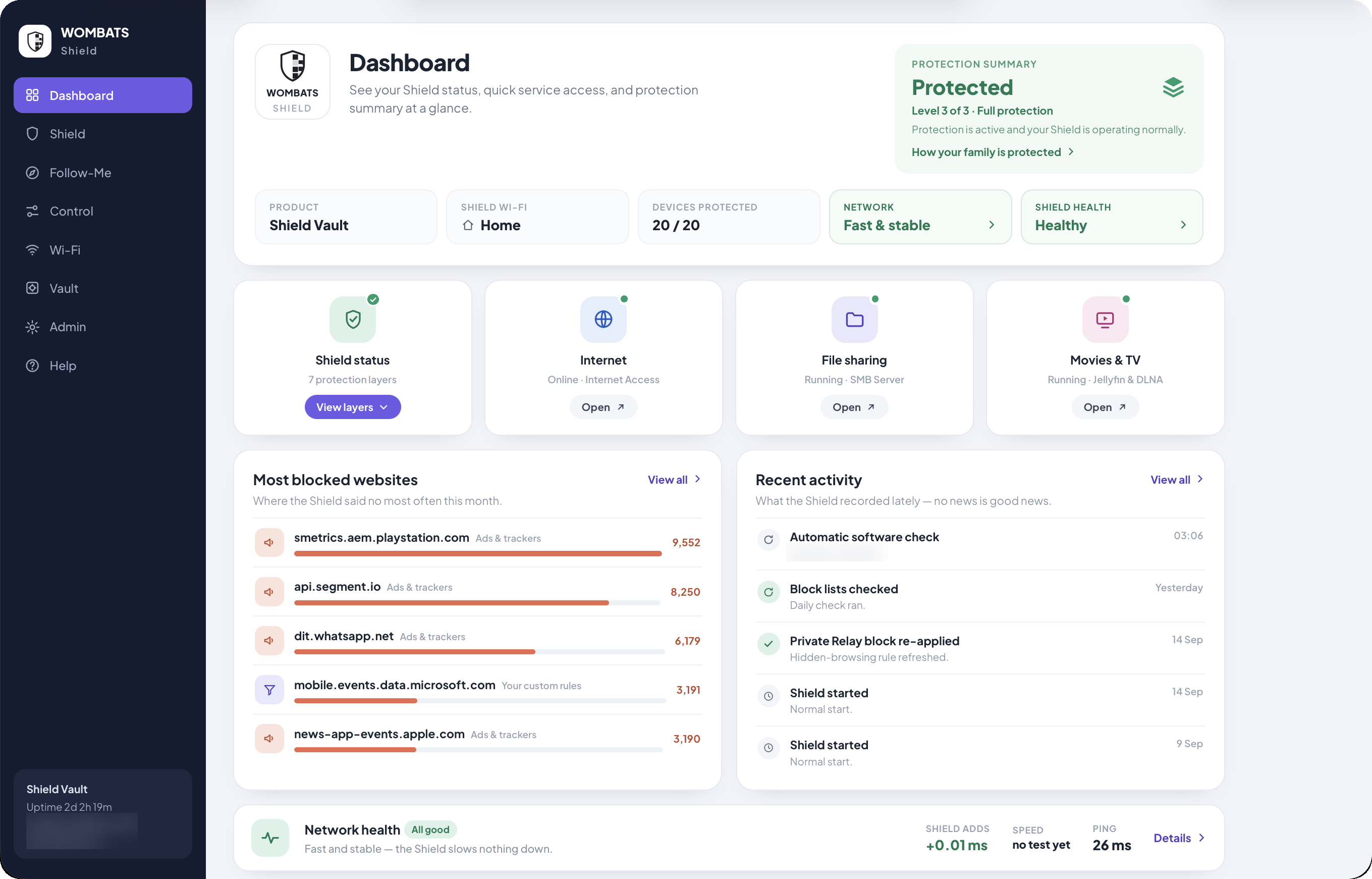
The Shield dashboard on a Shield Vault: a protection summary reading Protected, level 3 of 3, full protection; network fast and stable; Shield health healthy; the websites blocked most this month; and recent activity such as the daily block-list check.

At a glance

Whether protection is on, how the network is doing, and which sites were blocked most, all counted on the Shield itself.

Shield Vault shown

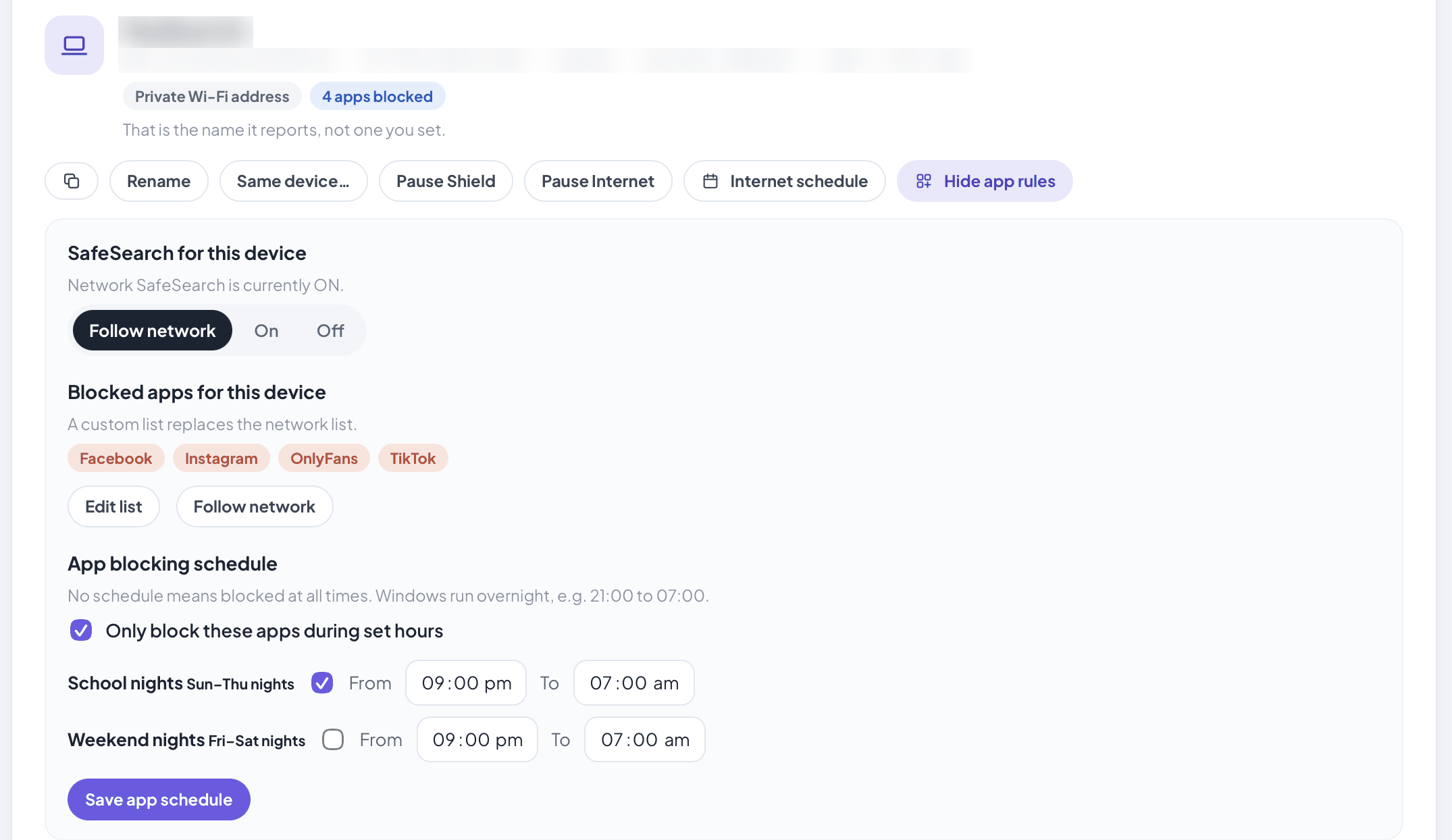
One laptop opened on the Control page: pause and internet-schedule buttons, SafeSearch following the network setting, four apps blocked for this device only, and those apps blocked only on school nights, 9 pm to 7 am. The device's name and network addresses are blurred.

Each device, on its own terms

Pause a device or set its internet hours without touching the rest of the house. On Edge and Vault, give one device its own SafeSearch and blocked apps, even just on school nights.

On Shield Edge and Vault

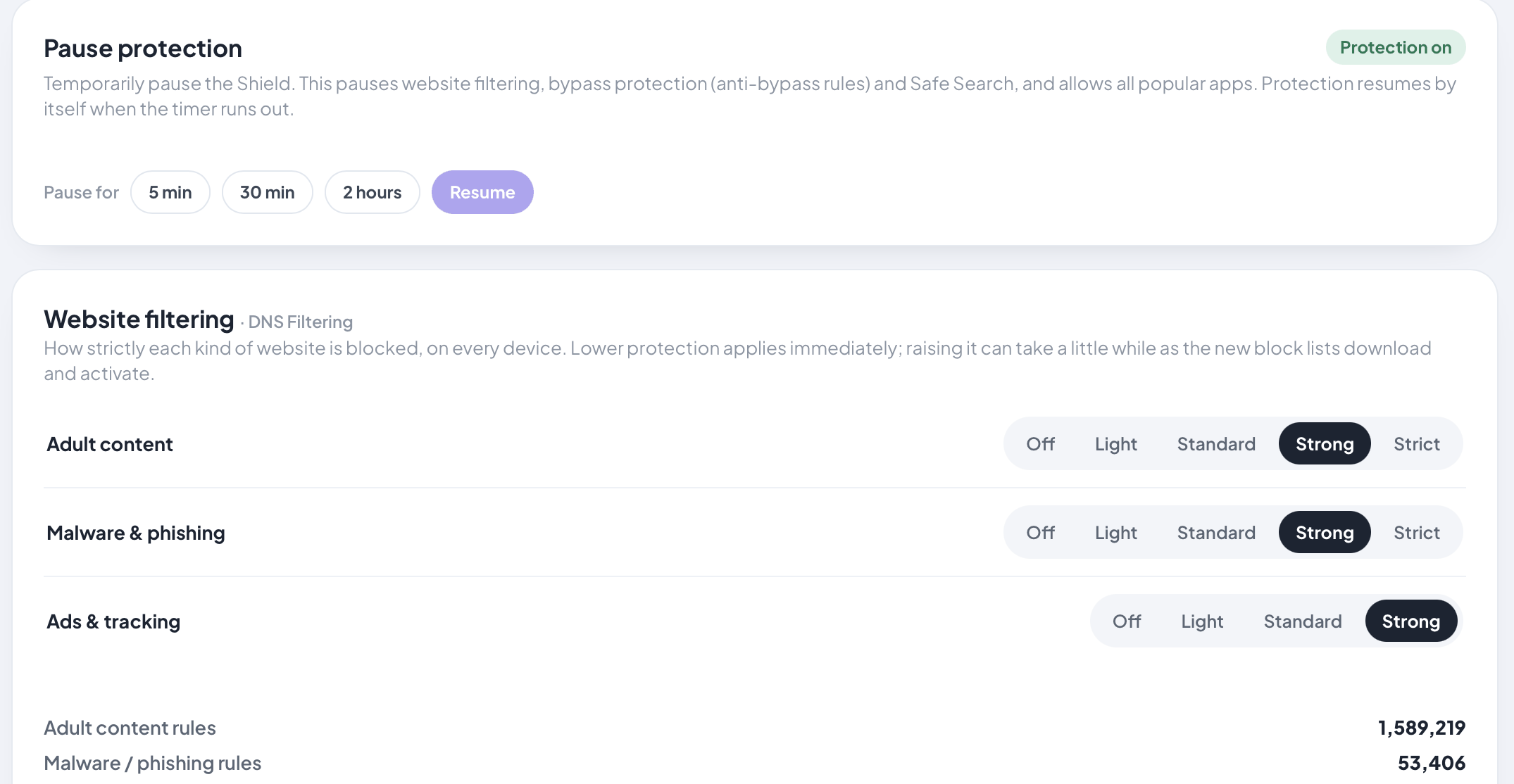
Shield settings: pause protection for 5 minutes, 30 minutes or 2 hours, and a filter strength from Off to Strict for adult content, for malware and phishing, and for ads and tracking, with a count of the rules in use.

Tune protection to your household

Choose how strictly each kind of site is filtered, or pause protection for a while.

Real screens from a Shield Vault, with demo settings. Device names, network addresses and a few internal details are blurred.

Who it's for

A good fit for some homes. Honestly not for others.

Shield is a considered purchase, and we'd rather you knew before you paid. If you're still unsure after reading this, ask us — 'it's not for you' is an answer we give.

Shield is for you if…

  • You want every device covered at once — the TV, the console and the smart speaker included — without installing and managing an app on each one.
  • You'd rather buy one thing once than rent protection by the month, and you want it to keep working whatever happens to us.
  • You want the filtering, the dashboard and the history to stay in your house: no account, no cloud, no one else reading it.
  • You like to see the mechanism — public filter lists, a dashboard on the device itself, signed updates you apply yourself.
  • You'd like to check in from your phone when you're out. On Shield Vault, Back to Shield opens the dashboard and the family's files from your phone or laptop away from home — no cloud account needed.

Probably not, if…

  • You enjoy networking as a craft. Custom firewall rules, VLANs and traffic flows are a different product's job, and our comparison says so plainly. Shield vs Firewalla →
  • You want to see inside your children's messages. Shield filters what the network serves; it can't read a chat or a video call, and it doesn't try. What Shield doesn't do →
  • You want to hide from your internet provider. Your provider still sees which sites you connect to; Shield stops everyone else building the profile. What Shield can and can't hide →

Pick your Shield

Three Shields. One simple choice.

Whole-network filtering, SafeSearch, pause and schedules are on every Shield. The difference is how finely you can aim the rules, and what else the box does.

Shield Core

Whole-house filtering, with pause and bedtime hours per device

$424

For protection, pause and schedules

Founding price · standard from unit 21: $574 plus $25 delivery

Pay in 4From $106.00 a fortnight with Afterpay or PayPal, interest-free — or Zip, with weekly, fortnightly or monthly repayments on Zip's terms.

Same total either way — $424 — and nothing recurring from WOMBATS.

  • Ads, trackers, adult content and phishing blocked for every device
  • SafeSearch and app blocking for the whole house
  • Pause and bedtime hours per device
  • Security updates until at least 31 December 2029
See Shield Core

Shield Edge

Adds rules for each child's device

$524

For per-child app and SafeSearch rules, and your own media

Founding price · standard from unit 21: $664 plus $25 delivery

Pay in 4From $131.00 a fortnight with Afterpay or PayPal, interest-free — or Zip, with weekly, fortnightly or monthly repayments on Zip's terms.

Same total either way — $524 — and nothing recurring from WOMBATS.

  • Everything in Core
  • Filtering, SafeSearch and app blocking per device
  • File sharing and a media library, on a USB drive you supply
  • Travel Wi-Fi over a cable
  • Security updates until at least 31 December 2029
See Shield Edge
The Flagship

Shield Vault

Adds built-in storage, cable-free travel Wi-Fi and Follow-Me

$724

For kids' phones away from home, backups and travel

Founding price · standard from unit 21: $914 plus $25 delivery

Pay in 4From $181.00 a fortnight with Afterpay or PayPal, interest-free — or Zip, with weekly, fortnightly or monthly repayments on Zip's terms.

Same total either way — $724 — and nothing recurring from WOMBATS.

  • Everything in Edge
  • A free 256 GB internal SSD, a backup drive for any computer (Time Machine for Macs) — paid upgrades to 1 TB, 2 TB or 4 TB
  • Cable-free travel Wi-Fi
  • Follow-Me Filtering: your rules on the kids' phones away from home, through a free app
  • Back to Shield: your dashboard and the family's files from your phone or laptop, away from home
  • Security updates until at least 31 December 2029
See Shield Vault

At the founding price, a Shield Core costs less than three years of Qustodio Complete at Australian pricing — and in year four it keeps filtering at $0.

Competitor prices are public list prices, checked July 2026; converted figures are approximate.

From $424 AUD · Dispatched within 2 weeks of order · 30-day home trial · Founding price locked in for life

Not sure yet? Talk to us before you order:

A promise that matters

If we disappear, your Shield keeps working.

There is no required activation server. No cloud login that can be turned off. No subscription that lapses. A big vendor can switch a device off from its cloud; Shield has no such switch to flip. The filter lists Shield uses are public and continue updating without us. The only thing you lose if WOMBATS as a company goes away is us, not your network.

  • No required cloud login
  • No required activation server
  • No vendor-controlled DNS path
  • Public filter lists keep updating

Common questions

The questions buyers ask before they order.

Where does my data live?+

On your network. Filtering and management run on the Shield itself. There is no vendor cloud control plane and no telemetry pipeline back to us.

What if WOMBATS goes away?+

Your Shield keeps working. There is no required activation server, no cloud login, and no monthly fee. Filter lists are public and can keep updating without us.

Will it work behind my modem?+

Yes, in most homes. Shield connects behind your existing modem over Ethernet. Your Wi-Fi stays the same. Setup typically takes about 15 minutes from a browser on your home network. If you have Starlink, eero or another router you can only set up in a phone app, talk to us before you order.

Can someone on my network bypass it?+

Shield blocks common encrypted-DNS bypass paths and Apple Private Relay at the network level. A determined user on a managed device can still tunnel out. You'll see them.

What if I want to remove it?+

Nothing Shield does is permanent. To protect every device, it takes over one job from your modem, handing out network addresses. To go back, you remove Shield and factory-reset your modem, a standard button-press, and you're exactly where you started. No lock-in, and every Shield has a 30-day home trial.

Does it slow down my internet?+

No measurable difference for everyday use. Filtering adds microseconds per lookup — far less than the variance in your connection itself. One deliberate exception: the first visit to a site nobody in your house has been to before can take a blink longer, because your Shield finds the address itself instead of handing the question to a DNS company. That's the privacy trade, and it happens once — after that the answer comes from Shield's own memory. Most households notice pages load slightly faster once ad and tracker requests stop going out.

What does protection really cost over time?+

Most families pay for protection by the month and never total it up. A leading parental-control app is $159.95 a year at Australian pricing — about $480 over three years, $800 over five. An all-in-one US family bundle converts to roughly $576 a year or more, renewing forever. A Shield Core is $424 at the founding price, bought once — less than three years of that single app. There is no subscription behind these numbers. A Shield keeps filtering in year four and year ten at $0, and it keeps working even if WOMBATS doesn't. The full comparison tables, with the date we checked the prices, are on the Why WOMBATS page.

Competitor prices are public list prices, checked July 2026; converted figures are approximate.

Founding Edition · 12 of 20 remaining

Take your home network back.

It belongs to you. That's the entire point.